62 operations
Customers, leads, opportunities, jobs, inventory, follow-ups, communication, reference data, and API health checks.
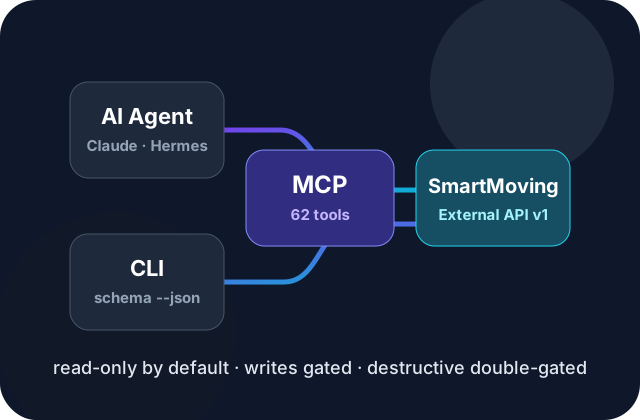
Launch status: public 0.1.0 prep. This repo documents an unofficial MCP server and CLI with 62 operations, read-only by default safety gates, and an agent-ready schema for terminal and MCP clients.
SmartMoving MCP + CLI exposes the SmartMoving External API v1 to authorized users through two local interfaces:
smartmoving CLI for diagnostics, schema discovery, smoke tests, command docs, and scripted workflows.Unofficial project. This project is not affiliated with, endorsed by, sponsored by, or certified by SmartMoving, LLC. “SmartMoving” is used only to identify the external API this project interoperates with.
62 operations
Safe by default
SMARTMOVING_ALLOW_WRITES=true; destructive tools also need SMARTMOVING_ALLOW_DESTRUCTIVE=true.Agent-ready schema
smartmoving schema --json exposes names, groups, safety levels, CLI metadata, related MCP tools, output modes, and exit codes.CLI + MCP
After maintainers publish the npm package, run:
npm install -g smartmoving-mcp-serverThen configure your API key privately and start with read-only commands:
smartmoving init --yes --profile default --api-key-env SMARTMOVING_API_KEYsmartmoving doctor --jsonsmartmoving schema --jsonFor one-off MCP launches after publish:
npx -y smartmoving-mcp-serverFor local development before publish, clone the repo and build from mcp-server/.